curatekkart: Rebranding and Automating a Home Bakery

curatekkart is a home bakery run by a friend of mine. I’d been meaning to work on it for a while, and I finally did it in two phases: a rebrand, then an order system that runs through WhatsApp using n8n (a workflow automation tool), Airtable (an online database) and Claude.
Rebranding
The colour palette was curated towards an artisan bread label rather than a typical home bakery. I wanted to keep a playful feel without going too upscale. The theme was Cocoa and Raspberry, with Playfair Display for headers and Jua for body text.
The pinstripe caused the only real trouble. It looked right on the original artboard but shifted on every new canvas. Scaling it to fit each background changed the stripe-to-gap ratio, so I fixed it by defining one tile with the stripe and gap dimensions set in advance, saving it as a pattern, and applying it at 100%.

By this point the wordmark, menu card, Instagram highlight covers and a pop.site page (a link-in-bio landing page) were done. I also had a cat mascot locked as a concept but never got to designing it. The shopfront was now fresh.
The Flow
Phase 2 was the fun stuff. Locking the flow was the main task; I didn’t want a ‘request’ to count as an order until the bakery owner (I call them the Client) approves it, and approving it should take as little effort as possible.
A customer (the Customer) messages the WhatsApp Business number. Meta’s API passes that message to n8n through a webhook (an automatic message sent between apps). Claude reads the casual text and pulls out the item, quantity, and delivery or pickup date, matching against the live menu and handling typos. A request becomes an order only when all the details have been collected and the Client has approved it.
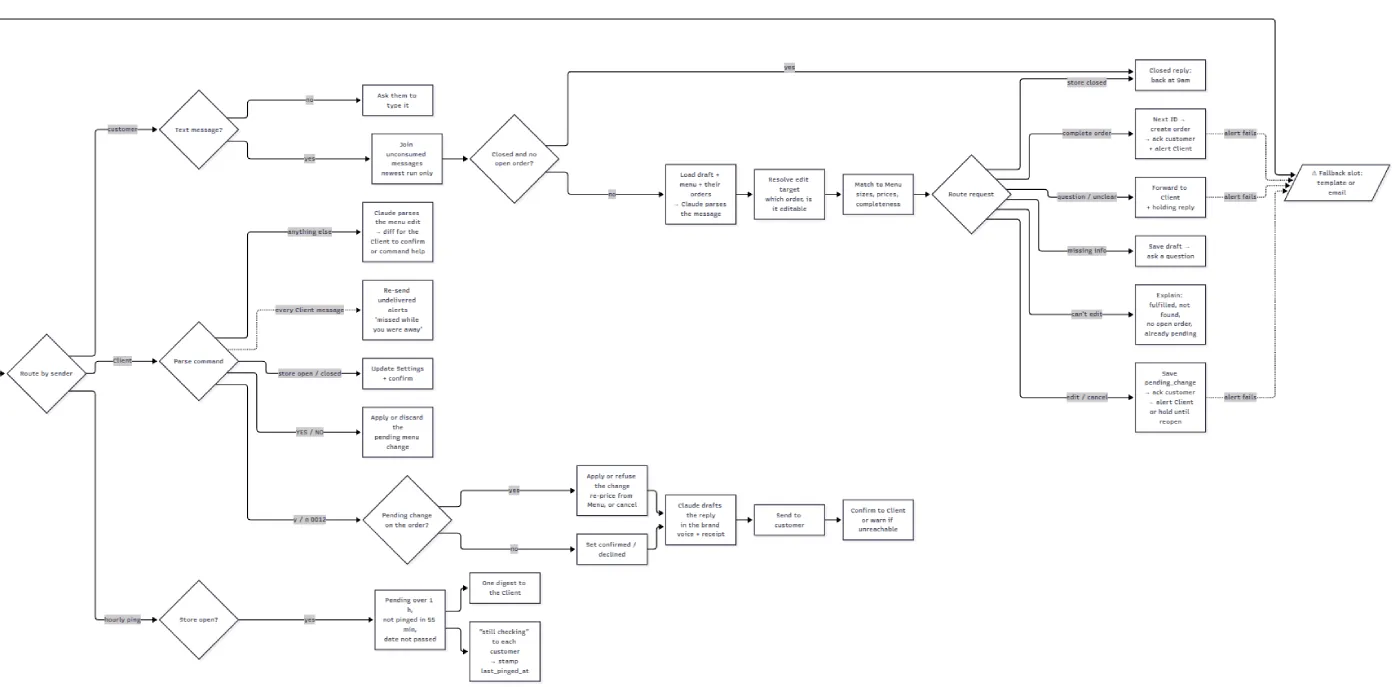
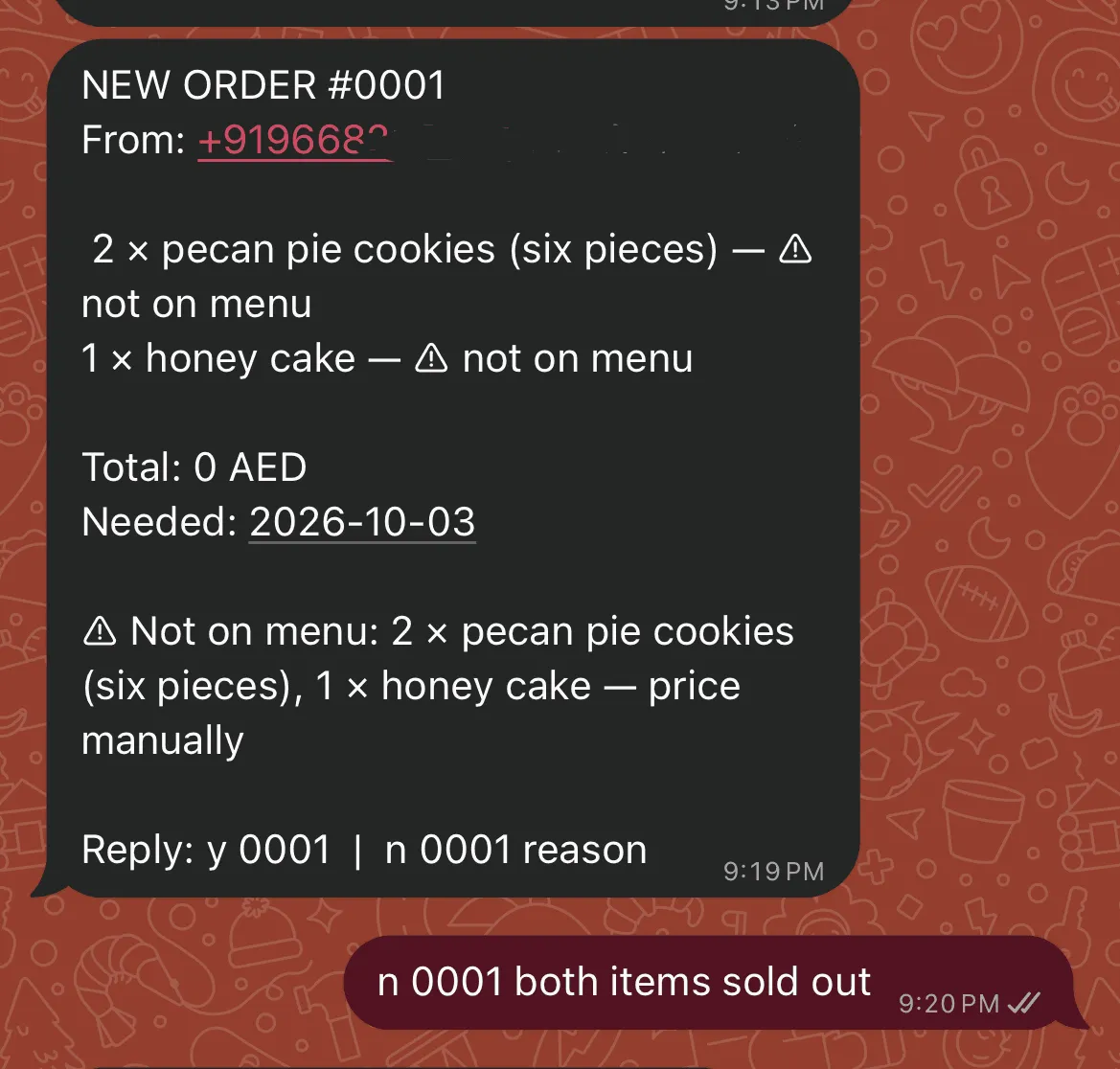
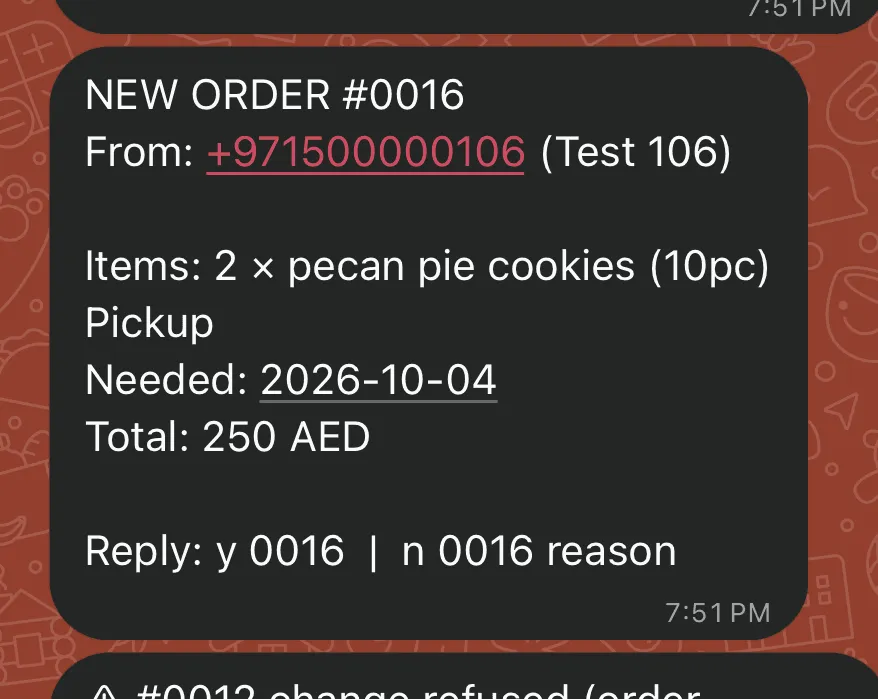
The Client answers with y or n plus the order number, for example y 0231 or n 0231 reason. A yes sends the Customer a confirmation and a text receipt. A no sends a decline with the reason. A casual WhatsApp message is easy to misread, and an order is a promise involving money, dates, and often preferences. I wanted a misread to be caught by a person before it turned into a commitment, and I wanted that check to cost the Client one short reply.
A request ends up in one of a few places. It sits as pending_review until the Client answers. A yes makes it confirmed and a no makes it declined. A confirmed order can later be cancelled or marked fulfilled, and once it’s fulfilled it can’t be edited. An edit or cancellation is its own pending request. The original order stays untouched until the Client approves, and if the Client refuses, the Customer gets the reason. Incomplete drafts expire if the Customer goes quiet.
I reused the same loop for everything else. When a Customer edits or cancels an order, the bot works out which open order they mean (asking if there are two), proposes the change, and sends it through the same y/n system. Menu changes work the same way. The Client texts the bot in plain language, Claude compares the change against the real Menu table and shows the before and after, and nothing is written until the Client replies with the full word YES. The store can also be opened or closed with a text, so orders, menu, and opening hours are all controlled from one chat.
In case the Client misses a new request, I configured an hourly ping that lists any requests still waiting for a response. These pings only go out between 9am and 6pm, the store’s open hours. Assuming the Client checks WhatsApp constantly during open hours, an hourly push is enough and nothing sits unanswered. Customers waiting on a pending request get a short “still checking” message at the same time.
During closed hours, my first instinct was to stop accepting orders altogether. But turning away a potential customer didn’t feel right for a business this size. So I treated those messages as requests too and answered them with a “back at 9am” reply. They are only passed on to the Client when the store reopens.
Some Customers send an order across several short messages, so I added a 20-second delay before the bot responds. Admin commands from the Client skip the wait entirely. Special notes are captured in this step too.
Delivery or pickup is asked at the point of ordering. Delivery carries an additional fee that is tracked separately from the item total, so it shows up on the receipt instead of hiding in the total.
Finally, if Meta reports that an alert to the Client failed to send, the alert is marked undelivered and re-sent on the Client’s next message as “missed while you were away.”
The Core
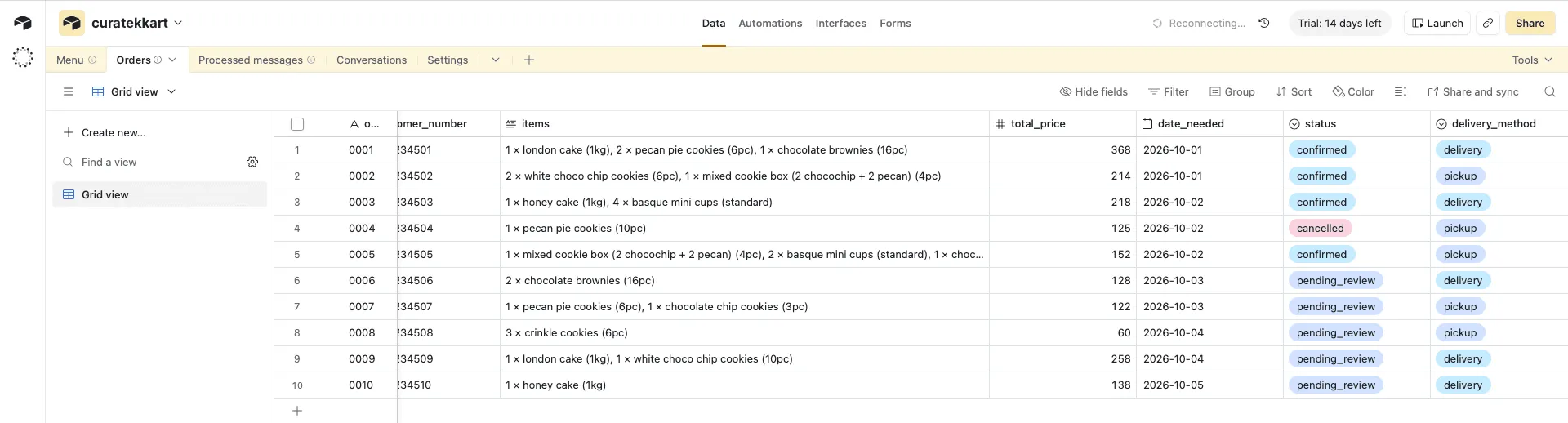
I wanted Claude to handle only language, and code to handle anything that has to be exact. Order totals are computed by a Code node (a step that runs a small script) in n8n from the live Menu rows in Airtable, so the money stays exact. Menu items are switched inactive instead of deleted, which keeps old orders intact. The whole system runs on five Airtable tables: Orders, Menu, Processed messages, Conversations, and Settings.
Customer-facing messages follow the brand voice: lowercase, with a set of kaomoji (Japanese-style text faces). It lives in one easily accessible place, so the tone can be changed later without touching the workflow. Messages to the Client stay plain and normally cased.
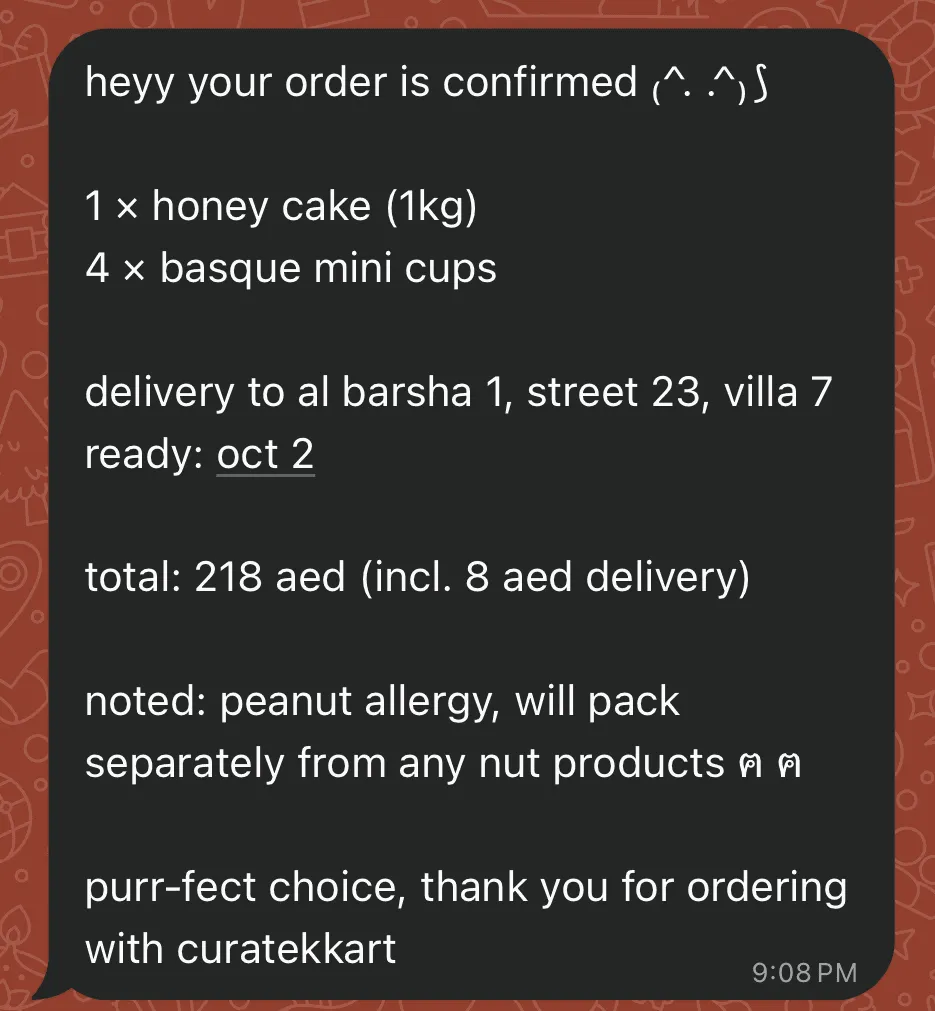
Security and Build
In plain terms: before acting on any message, the system checks it really came from WhatsApp, because otherwise a forged message could impersonate the Client. Since the Client’s number can issue commands, including confirming orders, editing the menu, and closing the store, the webhook checks every incoming message. Meta signs each request, so n8n recomputes an HMAC-SHA256 signature over the raw request body and compares the two. Anything that doesn’t match is rejected and logged as a failed run. The app secret sits in an n8n Crypto credential instead of a plain environment variable.
WhatsApp access runs on a permanent System User token (an access key that doesn’t expire). A Processed messages table also filters out duplicates when Meta retries a delivery.
The workflow runs in Docker (software that packages apps to run anywhere) on my own machine, with a Cloudflare tunnel exposing it to the internet so Meta can reach it. I designed the flow and used Claude to build it in n8n through n8n’s MCP (a way for Claude to control other tools).
Everything was tested with real, signed WhatsApp messages through a Meta test number, including a forged request, a repeated delivery, and the full order lifecycle. Anthropic API usage across the whole cycle cost roughly $0.15: 34 calls on Sonnet 5, around 51.5k input tokens and 5.2k output tokens. n8n stored 203 runs, and the bug log holds 9 bot bugs with causes and fixes.
What’s Next
The version I built is a few steps away from being production-ready: a real business number and Meta business verification, two Utility templates (WhatsApp’s pre-approved message formats) for feedback and pickup reminders, branded receipt images, and hosting it off my laptop so the server stays on regardless.
The feedback and reminder messages were part of my original plan. I wanted the workflow to request feedback 24 hours after an order was marked fulfilled (delivered), and to remind the Customer about their upcoming pickup slot. Both need approved Utility templates, so I deferred them to keep v1 testable without waiting on Meta’s approval. The feedback_sent and reminder_sent columns are already in the Orders table.
Looking back at the workflow, I can already see places to cut token cost. The menu text is sent on every parse call, and Anthropic’s API supports prompt caching, which would save a good amount of input tokens. I also used Sonnet by accident when Haiku would be enough, and left thinking on, which isn’t needed for something as simple as structured order parsing. My estimate is that fixing both could save me roughly 40% of the cost. Most of these changes won’t matter much at this scale, though.